

Obtaining immigration court hearing records is done primarily through the Executive Office for Immigration Review's Respondents Access Portal (RAP) and Court & Appeals System (ECAS), which give you direct, 24/7 access to your official electronic Record of Proceedings. These EOIR portals are the fastest route to your case file, transcripts, and hearing documents. Freedom of Information Act (FOIA) requests remain an option, but they add time and complexity that most respondents can avoid. This guide explains every method, who qualifies, and exactly how to submit your request.
How to obtain immigration court hearing records using EOIR's official systems
The Record of Proceedings, or ROP, is the official case file that EOIR maintains for every immigration court case. It is the authoritative source for everything that happened in your case, and understanding what it contains tells you exactly what you can request.
What the ROP includes
The ROP is not a single document. It is a structured file that holds all materials submitted to and generated by the immigration court throughout your case. Knowing its components helps you request precisely what you need.
- Transcripts of hearings: Written records of everything said during your immigration court hearings, produced by a court reporter or transcription service.
- Audio recordings: In many cases, the court records hearing audio, which may be available alongside or instead of a written transcript depending on the hearing format.
- Evidence and exhibits: Documents submitted by you, your attorney, or the government, including country condition reports, identity documents, and supporting declarations.
- Filings and motions: All written submissions to the court, including applications for relief, motions to continue, and government briefs.
- Judge's orders and decisions: Written rulings issued during and at the conclusion of your case.
EOIR distinguishes between the electronic Record of Proceedings (eROP) and older paper records. Cases filed or converted to electronic format are stored as eROP, accessible through RAP and ECAS. Paper records from older cases may require a FOIA request or direct contact with the court. The eROP system gives respondents and their legal representatives the ability to review and download documents without waiting for a government response.
What systems can you use to access immigration court documents?
Three primary routes exist for accessing immigration court records: the Respondents Access Portal (RAP), the EOIR Court & Appeals System (ECAS), and FOIA. Each serves a different user and a different purpose.

RAP is designed for respondents, meaning the individuals who are the subject of immigration court proceedings. You log in directly, verify your identity using your Alien Registration Number (A-number), and access your eROP documents. RAP and ECAS provide 24/7 access to electronic records, which means no waiting for business hours or mailed responses.
ECAS serves legal representatives, including attorneys and accredited representatives. Through ECAS, a lawyer can file documents, track case status, and access the eROP for clients they represent. If you have an attorney, they will typically use ECAS to pull your records on your behalf.
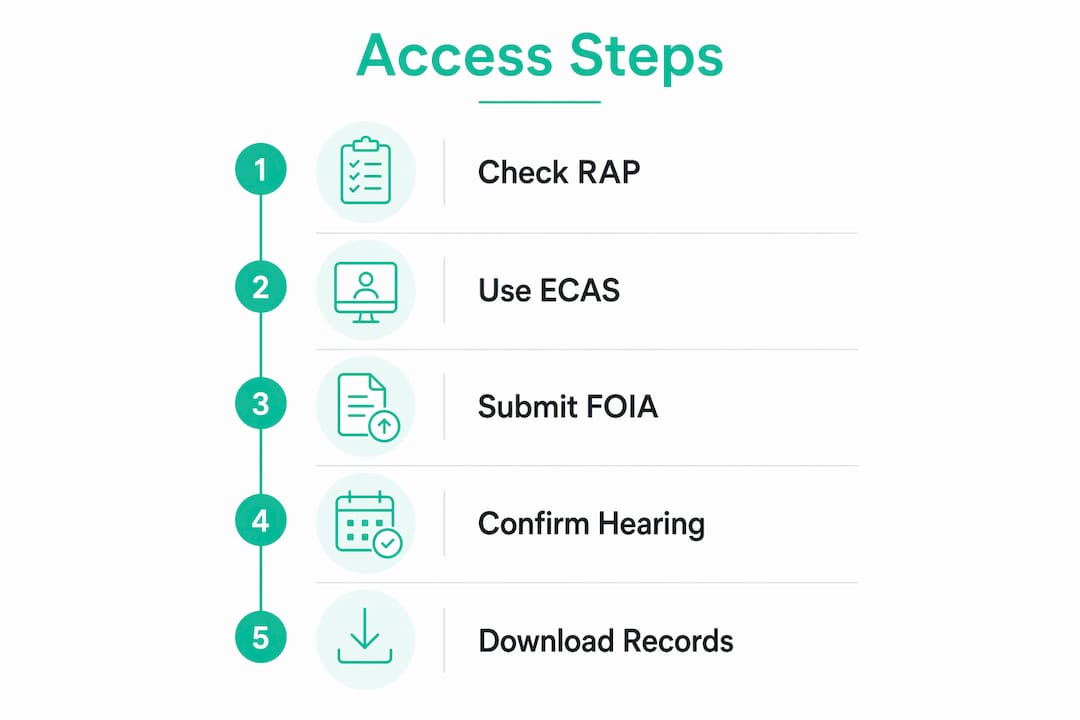
FOIA is the fallback. FOIA requests for immigration records can be slower and are best used for documents not available through EOIR's first-party portals, such as older paper records or certain agency communications. FOIA adds processing delays that can stretch from weeks to months.
One critical point: PACER does not contain immigration court records. PACER is the system for federal district and appellate court filings. Immigration courts operate under the Department of Justice, not the federal judiciary, so PACER is the wrong place to look. This is one of the most common mistakes people make when trying to retrieve immigration court transcripts.
| System | Who uses it | Access speed | Best for |
|---|---|---|---|
| RAP | Respondents (individuals) | Immediate, 24/7 | eROP documents, current cases |
| ECAS | Attorneys and representatives | Immediate, 24/7 | Filing, case management, eROP |
| FOIA | Anyone | Weeks to months | Older records, non-eROP documents |
| PACER | Federal court users | Immediate | Federal court only (not EOIR) |
Pro Tip: Always check RAP or ECAS before submitting a FOIA request. EOIR created these portals specifically to give first-party users faster and more complete record access, and using them first saves you significant time.
How to request your immigration case files step by step
The process differs slightly depending on whether you are the respondent using RAP or an attorney using ECAS. The steps below cover both paths.
-
Gather your case information. You need your A-number (a nine-digit number beginning with "A" on your immigration documents), the name of the immigration court where your case is or was heard, and your personal identification details such as your full legal name and date of birth.
-
Create or log into your EOIR account. Visit the EOIR website and register for an account if you do not already have one. Respondents register through the RAP portal. Attorneys and accredited representatives register through ECAS. Identity verification is required during registration.
-
Link your case to your account. Once logged in, enter your A-number and court location to connect your account to your case file. The system will display your eROP documents once the link is confirmed.
-
Review and download your records. You can view transcripts, filings, orders, and other documents directly in the portal. Download what you need for your records or to share with your attorney.
-
Request hearing audio separately if needed. Audio recordings of hearings are not always included in the eROP download. If you need the audio file, contact the specific immigration court directly by phone or written request to ask about availability and the process for obtaining it.
-
Submit a FOIA request for older or unavailable records. If your records predate the eROP system or are otherwise unavailable through RAP or ECAS, submit a FOIA request through the EOIR FOIA portal. Include your A-number, full name, date of birth, and a clear description of the records you are requesting.
-
Track your request. FOIA requests can be tracked through the DOJ's online tracking system. Note your request number at submission and check status regularly.
Pro Tip: Before submitting any records request, call the immigration court to confirm your hearing format. Confirming hearing format with the court significantly reduces the risk of receiving incomplete or missing records, especially for internet-based hearings.
How does your hearing format affect your hearing records?
EOIR conducts hearings in three formats: in-person, internet-based (video), and telephonic. The format of your hearing directly affects what records are available and how you access them.
For internet-based hearings, EOIR publishes specific dial-in numbers and video links for each immigration court, including judge-specific access codes. These details are available on the EOIR website under the court finder tool. If you are participating remotely, you need the correct link or dial-in number for your specific judge, not just the general court number.
Key points about hearing format and records access:
- In-person hearings typically produce the most complete paper and electronic records, including transcripts and any exhibits entered into evidence.
- Internet-based hearings may generate video or audio recordings in addition to transcripts, but availability varies by court and judge.
- Telephonic hearings produce audio records, and transcripts are generated from those recordings. The quality and completeness of transcripts can vary.
- Respondents without legal representation default to an in-person hearing format regardless of whether the court uses internet-based designations. This matters because it affects what media formats will be in your eROP.
- If you are unsure of your hearing format, contact the immigration court directly before your hearing date. Court staff can confirm the format and provide the correct access details.
Participation in telephonic or internet-based hearings affects what audiovisual records and transcripts appear in your eROP. If you participated by phone but expected a video record, the transcript may be your only option.
Common mistakes when trying to retrieve immigration court transcripts
Several predictable errors slow down or block access to immigration court records. Knowing them in advance keeps your request on track.
- Searching PACER for immigration records. The Reporters Committee for Freedom of the Press has documented access restrictions to immigration court records on PACER and has actively advocated for removing rules that block electronic access to immigration filings. PACER simply does not hold EOIR records. Going there first wastes time and causes confusion.
- Submitting a FOIA request before checking RAP or ECAS. EOIR built its direct portals to be faster than FOIA. Submitting a FOIA request for records that are already available in your eROP adds unnecessary delay.
- Not verifying your hearing format before requesting records. If you request a video recording but your hearing was telephonic, you will receive nothing. Confirm format first.
- Providing incomplete or incorrect case information. An incorrect A-number or wrong court location will prevent the system from locating your file. Double-check every detail before submitting.
- Failing to track FOIA requests. FOIA processing times vary widely. If you do not track your request number and follow up, requests can stall without notification.
Pro Tip: Keep a written log of every request you submit, including the date, method, reference number, and any responses received. This record protects you if a request is lost or delayed and gives your attorney a clear picture of what has been requested.
Key takeaways
Accessing your immigration court hearing records through EOIR's RAP and ECAS portals is faster, more direct, and more complete than any alternative method available to respondents.
| Point | Details |
|---|---|
| Use RAP or ECAS first | These portals give respondents and attorneys immediate access to eROP documents without FOIA delays. |
| Know your hearing format | Confirm whether your hearing is in-person, video, or telephonic before requesting records to avoid missing files. |
| PACER does not apply | Immigration court records are held by EOIR, not the federal judiciary system that PACER serves. |
| FOIA is a fallback | Reserve FOIA requests for older paper records or documents unavailable through EOIR's direct portals. |
| Document every request | Keep a written log of all submissions, reference numbers, and responses to protect against delays or lost requests. |
What I have learned from working with EOIR record requests
After working with clients across a wide range of immigration proceedings, I have seen the same pattern repeat itself. People spend weeks waiting for a FOIA response when their records were sitting in RAP the entire time. The EOIR direct portals were built precisely to solve this problem, and most respondents simply do not know they exist.
The hearing format question is the one that catches people off guard most often. A client once came to me frustrated that their transcript was incomplete. It turned out their hearing had been telephonic, but they had requested records as if it were an in-person proceeding. The audio existed, but the transcript derived from it had gaps. Knowing the format before you request saves that kind of confusion entirely.
My strong recommendation is to treat RAP or ECAS as your first stop, every time. If you have an attorney, ask them to pull your eROP through ECAS before you take any other step. If you are representing yourself, register for RAP and link your case immediately. The affirmative asylum process and other complex proceedings generate substantial records, and having them in hand early gives you a real advantage.
FOIA has its place, particularly for older cases or agency correspondence that falls outside the eROP. But it should be your last resort, not your first move. And if you are dealing with internet-based hearings, always confirm your access details directly with the court. Judge-specific access codes change, and using an outdated link will lock you out entirely.
— Mahmudul
How Hasan Legal PC can help you access your immigration court records
Navigating EOIR's portals and record request processes is straightforward when you know the system. When you do not, delays and errors can affect your case at critical moments. Hasan Legal PC provides direct, personalized support for individuals and families involved in immigration proceedings throughout the United States. Attorney Mahmudul Hasan, Esq., personally oversees every case, which means you get expert attention rather than a generic checklist. Whether you need help retrieving your eROP, preparing for a hearing, or understanding what your records mean for your case, the team at Hasan Legal PC is ready to assist. Schedule a free case evaluation today and get clear answers about your immigration records and next steps.
FAQ
What is the fastest way to get immigration court hearing records?
The fastest method is through EOIR's Respondents Access Portal (RAP) for individuals or the EOIR Court & Appeals System (ECAS) for attorneys, both of which provide 24/7 access to your electronic Record of Proceedings.
Can I use PACER to access my immigration court records?
No. PACER covers federal district and appellate court records only. Immigration court records are managed by EOIR under the Department of Justice and are not available through PACER.
How do I request immigration court transcripts specifically?
Log into RAP or ECAS and download available transcripts from your eROP. If transcripts are not yet available or your hearing was telephonic, contact the immigration court directly to request the audio recording or a transcript derived from it.
What if my records are not available in RAP or ECAS?
Submit a FOIA request through the EOIR FOIA portal, including your A-number, full name, date of birth, and a description of the records needed. This option is best for older paper records or documents outside the eROP system.
Does my hearing format affect what records I can access?
Yes. In-person, video, and telephonic hearings each produce different types of records. Confirm your hearing format with the immigration court before submitting any records request to avoid receiving incomplete or incorrect files.
Recommended
- U.S. Immigration Services | Hasan Legal PC
- Free Immigration Case Evaluation | Hasan Legal PC
- What Documentation and Evidence Is Required for an Adjustment of Status Application? | Hasan Legal PC
- What Are the Filing Instructions, Signature Requirements, and Visa Availability Rules for Form I-485? | Hasan Legal PC